MiniMax H3 Max Turbo turns a script or a still into a 2 to 15 second clip with native audio, and people in it speak the lines you write, clearly and in the language you ask for.
Four examples of original, unbranded products, with dialogue in Spanish and English, picked from two to four takes each. Nothing was edited. Results vary with your prompt, frames and settings.
Generated with MiniMax H3 Max Turbo
01
Text to video · 9:16 · 15 s · 1080p · Spanish
A product review in Spanish, word for word
One prompt with three timed lines. The creator says all three exactly as written, in a natural Chilean accent, while she shows the glass carafe and pours a cup. Her fingers on the carafe blur slightly in places.
Prompt direction+
A woman at a sunny kitchen table holds up a glass pour-over carafe and says in Chilean Spanish: «Les cuento por qué me enamoré de esta cafetera.» … «Es de vidrio, se lava en un minuto y el café queda suavecito.» … «De verdad, no vuelvo a las cápsulas.»
02
Text to video · 16:9 · 12 s · 1080p · two voices
Two people, three lines, no mix-ups
A customer asks, the seller answers and she decides, each line from the right person and easy to follow. The model added people in the background and a few letters on the front of the table, which the prompt ruled out. In earlier takes the last line came out slightly changed, so we shortened it.
Prompt direction+
At a ceramics market stall, she asks in Chilean Spanish: «¿Estas tazas se pueden meter al microondas?» He answers: «Sí, y al lavavajillas también. Las esmalto yo mismo.» She says: «Perfecto, quiero dos.»
03
Text to video · 16:9 · 10 s · 1080p · English
A maker’s pitch in English
The same model speaks clear American English. Both lines come out exactly as written while he oils a walnut board and lifts it to the camera. His apron gained a small red tag we had asked to leave out.
Prompt direction+
A woodworker oils a solid walnut cutting board and says: "Every board is cut from a single piece of walnut, so it never splits." Then: "Oil it once a month and it will last for years."
04
Starting frame · 6 s · 1080p
A product photo turned into a slow showcase
Starting from one of our product images, light glides across the headphones while the camera drifts around them, and the product keeps its shape and colors. Audio is always on, so this clip comes with quiet room tone.
Prompt direction+
The camera slowly orbits the headphones as soft daylight glides across the ear cups and the headband. The headphones stay still and unchanged. Quiet room ambience, no voices, no music.
Our signature test
The hummingbird test
Our logo is a hummingbird, so new models in HummingBytes get the same two briefs: turn our flat logo into a real neon sign, then show a hummingbird from scratch. Video models produce short clips.
Same prompts as the image models, in a square frame with default settings. Brief 1 uses our logo as the starting frame. One try per brief, shown as returned, with no retouching.
Video version · 5 seconds · square · 768p default · audio always on · brief 1 starts from our logo
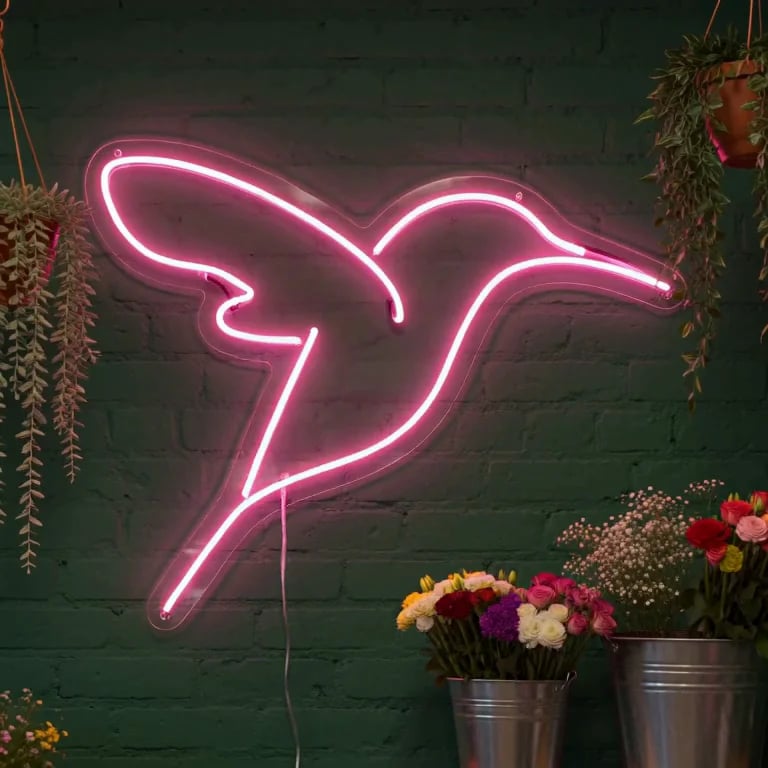
Brief 1 · Logo to neon sign. MiniMax turns our flat logo into a lit glass neon sign on a dark green brick wall, with hanging plants, a thin cable and buckets of flowers below. The tube keeps our two open lines and their gaps, with the beak right and the tail down-left. Small misses: the sign sits on a clear acrylic panel instead of bare mounting clips, and the change from the flat logo happens in the first instant.
Brief 2 · Hummingbird from scratch. One bird in the left half facing right, its wings a natural blur while the eye and beak stay sharp, beside a single pink fuchsia on dark green bokeh. It is not a full male Anna’s, though: only scattered magenta feathers at the throat, a green-brown crown and a pale chest. One foot hangs down, and the beak touches the edge of the flower rather than entering the bloom.
Image 1 is the HummingBytes logo: a hummingbird drawn with two continuous pink lines on a dark background. Turn that exact drawing into a real pink neon sign. Keep the same two lines, curves, gaps and proportions; do not add, join, close or smooth any lines, and do not draw the dark background tile. Mount the sign on a dark green painted brick wall inside a small flower shop at dusk. Hanging plants and a few buckets of fresh flowers sit below it, lit by the sign's soft pink glow. Show realistic glass tubing, small mounting clips and a thin power cable. Square frame, the whole sign visible and centered. Realistic interior photograph. No text, letters or other logos anywhere.
Brief 2 · Hummingbird from scratch
Macro wildlife photograph of a male Anna's hummingbird hovering beside a single pink fuchsia flower, its long thin beak just entering the bloom. Eye-level view, square frame, the bird in the left half facing right. Iridescent rose-magenta crown and throat, green back and grey chest; individual feathers on the head and back are sharp. The wings are a natural motion blur while the eye, beak and body stay in crisp focus. Soft early-morning light from the upper left, smooth dark green background with gentle bokeh. Anatomically correct: exactly two wings, one beak, tiny feet tucked under the body. No text, no watermark, no border.
Where it fits
Talking clips for reviews, ads and demos
Use MiniMax H3 Max Turbo when someone in the shot has to say something: a review, a pitch or a short scene between two people.
Creator-style reviews
A person shows your product to the camera and says the lines you wrote, in a natural voice.
Ads in Spanish and English
Write the dialogue in the language of your market; the voice follows it clearly.
Short scenes with two people
Give each person a line and a time; the model keeps who says what.
Fast drafts
Try an idea at 480p for a few credits, then make the final cut at 1080p.
Know the current boundaries
MiniMax H3 Max Turbo creates new clips from text or a starting frame.
Audio is always on
Every clip comes with sound. To get a silent clip, mute or remove the track after downloading.
It can add things
It may add people or objects the prompt did not ask for, such as a window or a lamp. Say what must stay out, and check every take.
No reference sets
It takes a prompt, a starting frame and an optional ending frame, but no reference images, videos or audio. Use Gemini Omni 1.2 Flash or Seedance 2.5 for reference-led work.
No video editing
It creates new clips; it does not edit or extend an existing video.
Where to go next
Compare model results, explore a feature, or find a starting point for your next project.
Describe the person, the product and the setting, then write each spoken line in quotes with the second it starts.
Review
A creator talks about your product
Vertical 9:16 video, one continuous shot, like a creator's product review. A woman in her thirties holds up one original, unbranded product at a sunny kitchen table. 0 to 5 seconds: she looks into the camera and says: "I've used this every day for a month." 5 to 10 seconds: she turns it toward the camera and says: "And honestly, I'm not going back." Natural, friendly voice. Plain walls. No text, captions, logos or music.
Vertical 9:16 video, one static shot, realistic and warm. A man in his forties stands behind a shop counter holding one original, unbranded product. 0 to 5 seconds: he looks at the camera and says in Latin American Spanish: «Este lo hacemos a mano, uno por uno.» 5 to 9 seconds: he smiles and says: «Pídelo hoy y te llega mañana.» Natural voice. No text, captions, logos or music.
Animate this exact still as one continuous shot. Keep the product exactly as it is. A hand enters and turns it slowly toward the camera while a calm voice says: "Made to last, designed to be used every day." Quiet room ambience, no music. No text or logos.
What can MiniMax H3 Max Turbo create on HummingBytes?+
It creates new videos with sound from a written prompt, or from a starting frame with an optional ending frame. It does not take reference images, reference videos or audio files, and it does not edit existing videos. Explore Gemini Omni 1.2 Flash
Can people in the video speak Spanish?+
Yes. Write the lines in the prompt and name the language, for example “says in Chilean Spanish”. In our tests the words came out exactly as written and easy to understand. It also speaks English and other languages.
What output does it deliver?+
Videos of 2 to 15 seconds at 480p, 768p or 1080p and 24 FPS, always with audio. Text-to-video clips are 16:9, 9:16, 1:1, 4:3, 3:4 or 21:9; clips made from a frame follow that frame’s proportions.
How much does MiniMax H3 Max Turbo cost?+
It is priced per second, and the rate depends on the resolution. The shortest clip, 2 seconds at 480p, costs 10 credits, and 5 seconds at 768p costs 40. The studio shows the exact price before you create. View pricing
Which plans include MiniMax H3 Max Turbo?+
MiniMax H3 Max Turbo is available on the Starter, Creator and Pro plans.
Will my product stay exactly the same?+
Not always. AI video can change labels, colors or shapes, and this model sometimes adds people or objects you did not ask for. Watch the whole clip against your real product before you publish it.
How long does a video take?+
Often one or two minutes, and longer when the model is busy. Our 15-second 1080p tests took about a minute each.
Ready to make a clip?
Write the lines and let your product be presented.
Describe the scene, put the dialogue in quotes, and choose the length and resolution.